
从 mmap 理解进程地址空间
- 通义千问=》Manus
- 大语言模型是不固定的,它会出现幻觉
进程的地址空间
进程的初始状态(execve 后复位的状态)
- 寄存器:可直接打印
- 内存:字节数组。内存的绝大部分空间都不可访问
- 写一段c代码,把main赋值给一个指针,然后解引用,然后输出。会打印出main在地址空间的地址,但是不能对该指针赋值。
- 内存只能ld、sd
Registers
| Register | Hex Value | Decimal Value |
|---|---|---|
| rax | 0x0000000000000000 | 0 |
| rbx | 0x0000000000000000 | 0 |
| rcx | 0x0000000000000000 | 0 |
| rdx | 0x0000000000000000 | 0 |
| rsi | 0x0000000000000000 | 0 |
| rdi | 0x0000000000000000 | 0 |
| rbp | 0x0000000000000000 | 0 |
| rsp | 0x00007fffffffdb10 | 140737488345872 |
| r8 | 0x0000000000000000 | 0 |
| r9 | 0x0000000000000000 | 0 |
| r10 | 0x0000000000000000 | 0 |
| r11 | 0x0000000000000000 | 0 |
| r12 | 0x0000000000000000 | 0 |
| r13 | 0x0000000000000000 | 0 |
| r14 | 0x0000000000000000 | 0 |
| r15 | 0x0000000000000000 | 0 |
| rip | 0x0000000000401740 | 4200256 |
| eflags | 0x0000000000000200 | 512 |
Memory Mappings
| Start Address | End Address | Size | Permissions | Name |
|---|---|---|---|---|
| 0x400000 | 0x401000 | 0x1000 | r--p | /home/czc/jyy/address-space/simple |
| 0x401000 | 0xe7f000 | 0xa7e000 | r-xp | /home/czc/jyy/address-space/simple |
| 0xe7f000 | 0xea5000 | 0x26000 | r--p | /home/czc/jyy/address-space/simple |
| 0xea5000 | 0xeac000 | 0x7000 | rw-p | /home/czc/jyy/address-space/simple |
| 0xeac000 | 0x18b2000 | 0xa06000 | rw-p | [heap] |
| 0x7ffff7ffa000 | 0x7ffff7ffe000 | 0x4000 | r--p | [vvar] |
| 0x7ffff7ffe000 | 0x7ffff7fff000 | 0x1000 | r-xp | [vdso] |
| 0x7ffffffdd000 | 0x7ffffffff000 | 0x22000 | rw-p | [stack] |
readelf
sh
$ readelf -h simple
ELF Header:
  Magic:   7f 45 4c 46 02 01 01 03 00 00 00 00 00 00 00 00
  Class:                             ELF64
  Data:                              2's complement, little endian
  Version:                           1 (current)
  OS/ABI:                            UNIX - GNU
  ABI Version:                       0
  Type:                              EXEC (Executable file)
  Machine:                           Advanced Micro Devices X86-64
  Version:                           0x1
  Entry point address:               0x401740
  Start of program headers:          64 (bytes into file)
  Start of section headers:          11269904 (bytes into file)
  Flags:                             0x0
  Size of this header:               64 (bytes)
  Size of program headers:           56 (bytes)
  Number of program headers:         10
  Size of section headers:           64 (bytes)
  Number of section headers:         34
  Section header string table index: 33
入口地址和上面的rip一致
- 内存空间里,从0x400000开始之前的位置都是不能访问的地方
- vvar是数据(不可执行)
- vdso是代码(可执行)
- 系统调用不一定进入内核
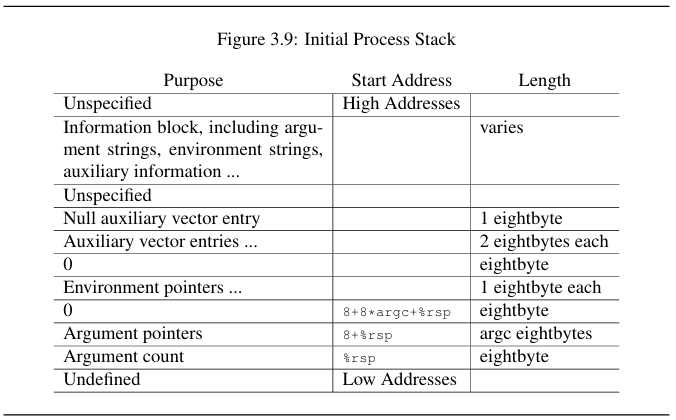
初始化栈,从栈顶(低地址)开始是 argc,argv,0,指针数组。
- 进程的初始状态
- 只有elf文件里声明的内存
- 一定有系统调用可以改变进程的地址空间
- Memory Map系统调用
c
// 映射
void *mmap(void *addr, size_t length, int prot, int flags, int fd, off_t offset);
int munmap(void *addr, size_t length); // 修改映射权限
int mprotect(void *addr, size_t length, int prot);
//e.g.
void *mem1 = mmap(
        NULL,                   // Let the kernel choose the address
        4096,                   // Allocate 4KB
        PROT_READ | PROT_WRITE, // Read and write permissions
        MAP_PRIVATE | MAP_ANONYMOUS, // Private mapping not backed by a file
        -1,                     // No file descriptor needed for anonymous mapping
        0                       // No offset
    );
void *exe_map = mmap(
        NULL,                   // Let the kernel choose the address
        st.st_size,             // Map the whole file
        PROT_READ,              // Read-only permissions
        MAP_PRIVATE,            // Private mapping
        fd,                     // File descriptor
        0                       // Start from the beginning of the file
);- linux使用ps查看进程号
- pmap +pid可以查看进程的地址空间
pmap <pid>可以打印一个进程的地址空间- 有一个文件夹是
/proc/<pid>对这个文件进行ls可以看到进程里面有什么信息maps文件就是进程的文件夹 strace pmap <pid> &| vim -a可以查看系统调用序列
- 有一个文件夹是
- 文件描述符打开文件
int fd = open(argv[0], O_RDONLY); - gdb,
p mem1查看指针地址
c
    // Example 2: Map the executable itself (argv[0])
    int fd = open(argv[0], O_RDONLY);
    if (fd == -1) {
        perror("open");
        return 1;
    }

    // Get file size
    struct stat st;
    if (fstat(fd, &st) == -1) {
        perror("fstat");
        close(fd);
        return 1;
    }

    // Map the executable file
    void *exe_map = mmap(
        NULL,                   // Let the kernel choose the address
        st.st_size,             // Map the whole file
        PROT_READ,              // Read-only permissions
        MAP_PRIVATE,            // Private mapping
        fd,                     // File descriptor
        0                       // Start from the beginning of the file
);- 映射一个文件到内存中
- alloc申请内存只需要放开权限而不需要真的申请。到真的访问的时候产生一个缺页异常,检查权限再分配
- 磁盘前512个字节可以打印出来,磁盘512字节末尾可启动标记是
0x55AA
python
import hexdump
import mmap
with open('/dev/sda', 'rb') as fp: mm = mmap.mmap(fp.fileno(), prot=mmap.PROT_READ, length=128 << 30) hexdump.hexdump(mm[:512])
入侵地址空间
- GDB
- 修改程序状态,修改地址空间
金手指:直接物理劫持内存
- 听起来很离谱,但“卡带机”时代的确可以做到!卡带上 ROM(静态素材,代码素材)和 RAM 一起映射到内存地址空间
- 为什么叫“外挂”?因为真的是外挂。

今天我们有 Debug Registers 和 Intel Processor Trace
帮助系统工具“合法入侵”地址空间
- 计算机给 ROM 一个地址,ROM 返回一个值
- 添加功能模拟行为,传输地址信号和数据信号
- 增加查找表 LUT,运行从这里执行配置。在 ROM 传递信号时,读到一处替换成另一个值
- https://www.howtogeek.com/706248/what-was-the-game-genie-cheat-device-and-how-did-it-work/
- 计算机给 ROM 一个地址,ROM 返回一个值
现在的游戏动态分配内存,地址不一样,解决方案:
查找 + Filter
- 进入游戏时 exp=4950exp=4950
- 打了个怪 exp=5100exp=5100
- 符合 4950→5100 4950→5100 变化的内存地址是很少的
- 好了,出门就是满级了
- 金山游侠 Hack DirectX 游戏内呼叫
- 类似游戏的调试器
string memfile = "/proc/" + to_string(pid) + "/mem";查看进程的内存,把内存当文件打开
DMA 外挂
- 内存 DDR 上加一个一样的卡拷贝内存
- 用设备和操作系统共享内存,可以读取内存
采集视频信号
- 采集卡(MS2130)+ 树莓派 = 外挂
- 输出视频信号,使用模式识别检测视频信号并标记。
- FPGA,使用 IP 核合成视频
- 可以作为 copilot